


The ideal gastroenterology billing software for U.S. medical practices should streamline every step from a completed patient visit to payment reconciliation. For a GI practice, that means giving staff a clear way to review procedure charges, resolve claim problems, follow outstanding balances, and answer patient billing questions.
A useful purchasing decision starts with those tasks. Before reviewing product demonstrations, identify where your current process breaks down. Does documentation reach billing late? Do procedure charges require repeated manual entry? Can staff see why a claim remains unpaid?
Software used to support these workflows includes ModMed gGastro with gPM, athenaOne, eClinicalWorks, and NextGen Enterprise. Understanding their available tools starts with identifying the clinical and financial tasks your practice needs to manage.
What should gastroenterology billing software help your team do?
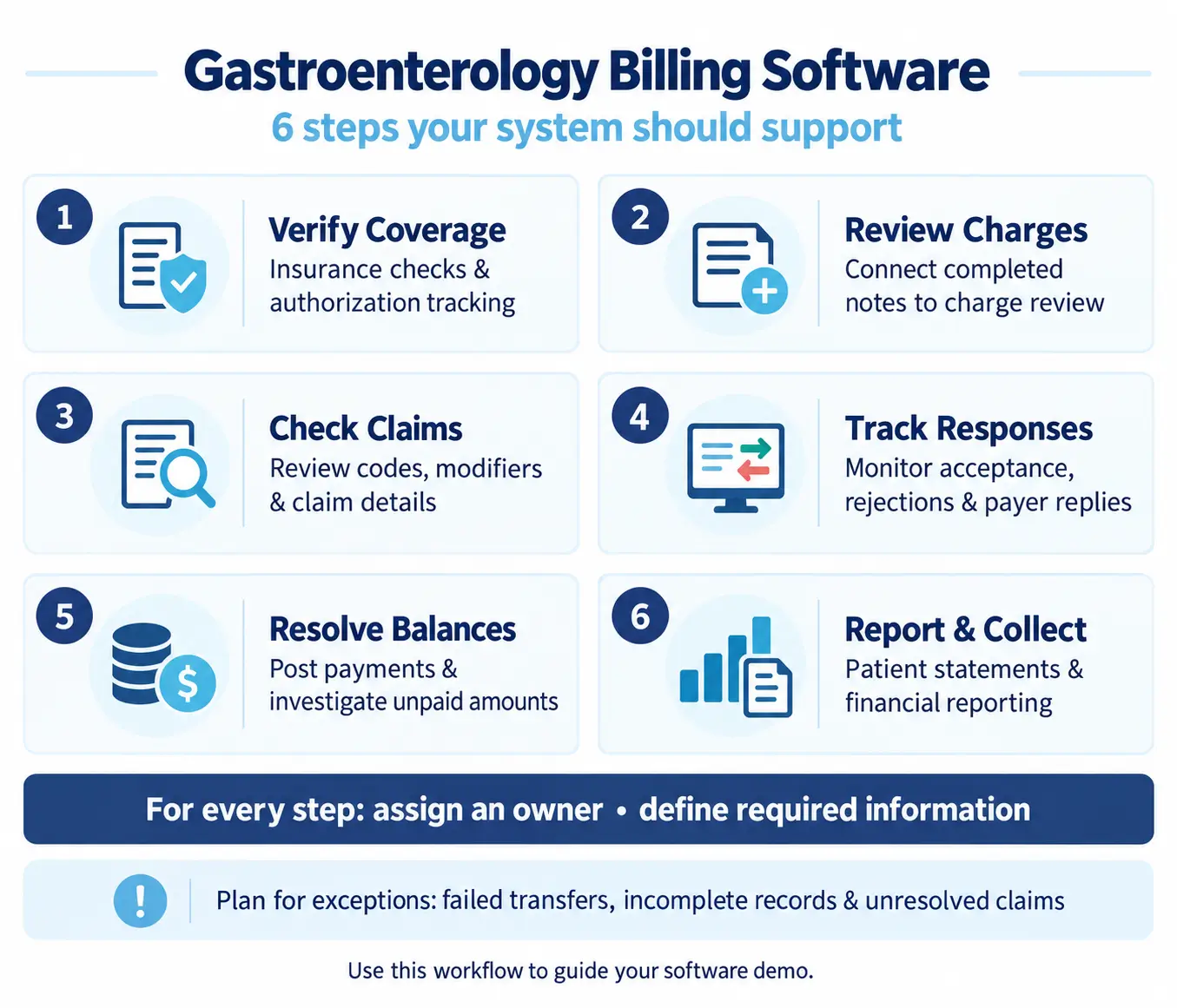
Build your requirements around a complete billing workflow. Ask the proposed system to demonstrate how staff can:
- Verify insurance information and track authorization details.
- Connect completed documentation to charge review.
- Review codes, modifiers, and claim information before submission.
- Monitor claim acceptance, rejections, and payer responses.
- Post payments and investigate unresolved balances.
- Manage patient statements and financial reporting.
For each task, identify the person responsible and the information they need. An automated step still needs an exception process. Your team should know where failed transfers, incomplete records, and unresolved claims appear.
Use this workflow map as the basis for your software demonstration. It gives the vendor a concrete set of requirements and gives your staff a consistent way to assess the result.
Software platforms supporting gastroenterology billing
ModMed gGastro and gPM
ModMed connects its gastroenterology EHR, gGastro, with its practice management system, gPM. The company lists eligibility verification, customizable claim scrubbing, automated claim submission, remittance posting, and rejection and denial reporting among gPM’s features.
ModMed also describes documentation-based coding suggestions that users review before a bill moves to gPM. Patient payment tools are available through ModMed Pay. Ask which modules, interfaces, and services are included in the proposed configuration.
athenaOne
athenahealth offers athenaOne for gastroenterology, combining EHR, medical billing, and practice management capabilities. Its billing tools include automated claim scrubbing, follow-up prioritization, and guidance for coding-related denials.
A practice evaluating athenaOne should walk through its own procedure documentation and billing process. Establish which tasks the practice retains, what support is included, and how unresolved claims move between responsible teams.
eClinicalWorks
eClinicalWorks offers gastroenterology EHR and practice management tools covering scheduling, documentation, billing, and follow-up. Its GI product information also describes connections involving pathology laboratories, scopes, and monitoring devices.
The company offers self-service RCM technology and an RCM service model. Advertised billing capabilities include eligibility information, claim submission, electronic remittance posting, and denial and appeal management. Confirm the scope of the selected arrangement and the work remaining with practice staff.
NextGen Enterprise
NextGen Enterprise includes practice management capabilities for scheduling, eligibility checks, billing, claims processing, reporting, and analytics. Its Enterprise PM documentation also identifies billing and statement management.
For a GI implementation, request a demonstration of the proposed procedure documentation interfaces, charge review process, and financial reports. Define the necessary provider, location, and billing-entity configuration in writing before implementation.
Choosing the best gastroenterology billing software for US medical practices
Start with your practice’s actual workload. List office encounters, endoscopy procedures, locations, billing entities, and staff roles. Specify whether your team handles professional billing, facility billing, or both.
Select de-identified examples of a paid claim, a corrected claim, an unresolved denial, and a patient account requiring investigation. Ask staff to follow each record through the proposed system.
Pay particular attention to charge capture. Can staff trace a submitted charge to its documentation and identify who reviewed it? Ask how an unfinished encounter stays visible and how the team locates a completed procedure that never reached billing.
Support careful gastroenterology coding review
Gastroenterology billing and coding tools should be evaluated through realistic documentation examples. Ask staff to review proposed CPT codes, ICD-10-CM codes, modifiers, and units while viewing the supporting record.
If the system offers coding suggestions, request a demonstration of both acceptance and correction. Can a reviewer change a suggestion, explain the decision, and return the record to the clinician for clarification?
Include a case requiring additional documentation. Observe whether the software distinguishes a record awaiting clarification from a claim ready to submit.
Ask the vendor to explain how code updates and claim edits are maintained. Establish who reviews configuration changes and how the practice will learn about updates affecting its workflows.
Treat coding assistance as a feature to test, with a defined review process and documented responsibility.
Keep eligibility and authorization information accessible
Use a scheduled procedure to test insurance eligibility verification and authorization tracking. Ask the demonstrator to locate the insurance response, authorization record, approved dates, and relevant communication history.
Then change part of the scenario. Move the appointment to another date or location and ask staff to reassess the record.
Check whether the proposed system makes the information easy to find and whether the practice can assign follow-up work. Request a demonstration of an unresolved authorization task approaching the procedure date.
Define what your front office, authorization staff, and billing team each need to see. Include a method for documenting payer communications and escalating questions that remain unanswered.
Connect clinical documentation with billing
When evaluating integration with gastroenterology EHR software, follow the movement of specific information. Ask which demographics, encounter details, procedure records, diagnoses, and charges transfer between systems.
Do not stop after a successful transfer.
Request a failed-transfer example and a correction workflow. Determine how staff receive an alert, identify the affected encounter, and confirm that the corrected information reached its destination.
Also ask what happens when documentation changes after a charge has already transferred. Check how duplicate entries are prevented or identified and who decides whether further billing action is needed.
Include interface monitoring, support responsibilities, and maintenance costs in the implementation scope.
Make denial management actionable
A denial management demonstration should begin with a payer response and continue through the next action. Ask a biller to locate the reason, supporting documentation, follow-up history, and assigned owner.
Test whether staff can organize work by payer, balance, deadline, and reason. Have the vendor show how an item is reassigned or escalated when someone is absent.
Keep rejected claims and adjudicated denials identifiable in your reporting requirements. Ask the vendor to explain exactly how its reports classify each category.
For an appeal example, request a demonstration of attaching evidence, recording submission, and scheduling follow-up. Continue the exercise until the payer responds and the account is updated.
This approach evaluates the work behind a denial dashboard.
Build useful A/R reporting
Specify the accounts receivable reports your practice needs before reviewing analytics screens. Include insurance and patient balances, aging categories, location, provider, payer, and billing entity where relevant.
Ask staff to open an individual account directly from a report and investigate its balance. They should be able to explain the charges, payments, adjustments, and remaining amount.
Request definitions for every performance measure you intend to use. For example, ask how the system calculates days in A/R and what it includes in a denial rate.
Use a small sample to reconcile a report to underlying accounts. This helps establish whether the information is understandable and suitable for your financial review process.
Evaluate patient billing and payment workflows
Patient billing deserves its own demonstration. Ask the vendor to show a statement, an online payment, a payment plan, and a patient inquiry about an outstanding balance.
Include exceptions such as a duplicate payment, unapplied credit, refund, or disputed charge. Observe how staff investigate each item and record the resolution.
Review statement wording and account history from the patient’s perspective. Can your team explain which encounter the balance relates to and what activity has occurred?
Request a breakdown of payment processing, statement, and messaging charges. Also establish who supports patients when a payment fails or a portal does not display the expected information.
Account for multiple locations and ASC operations
For a multi-location group, test centralized billing alongside location-specific access. Ask staff to work accounts from two locations and produce both separate and consolidated reports.
Include provider assignments, billing entities, and permission restrictions in the exercise. Verify that the proposed setup reflects how your organization actually operates.
If an ASC is within scope, specify the facility and professional billing responsibilities separately. Ask the vendor to document supported claim workflows and required interfaces.
Include pathology and anesthesia coordination where relevant to your operations. Identify which information your staff must exchange and which organization owns each billing task.
Get these requirements into the written implementation scope.
Budget for implementation and ongoing operations
Request an itemized proposal covering subscriptions, required modules, data conversion, interfaces, training, clearinghouse transactions, statements, and payment processing.
Include staff time in the implementation plan. Assign responsibility for testing payer connections, reviewing converted balances, validating reports, and resolving problems after launch.
Decide how existing A/R will be worked during the transition. Ask whether historical claim notes, remittances, and appeal records will remain accessible.
If gastroenterology medical billing services are part of the proposal, document the service responsibilities separately. Clarify who handles coding questions, appeals, patient calls, and unresolved balances.
Set acceptance criteria before signing. These might include successful sample claim workflows, reconciled opening balances, usable reports, and completed staff training.
Use a practical acceptance test
Before committing, have the people who will use the system complete the sample tasks themselves. Record where they need assistance, where information is missing, and which steps require work outside the proposed platform.
Ask the vendor to resolve those findings in writing. Separate functions available today from requested configuration work or future development.
The best gastroenterology billing software for US medical practices should demonstrate the workflows your team needs, with understandable costs and clear ownership of outstanding work. Choose it after staff can follow an encounter through billing, explain the resulting balance, and identify the next action without losing track of the record.