


Type “Aprima” into a job posting search today, and the name still turns up constantly in medical billing and coding listings, even though the company that built it hasn’t existed as an independent business since 2019. That’s because Aprima, the EHR and practice management platform many clinics still call by its original name, is now sold under a different label: CGM APRIMA, a product of the German health IT company CompuGroup Medical. For providers weighing whether to adopt or keep using the software, and for billing and coding students likely to encounter it during an externship or first job, the practical questions are similar: what does the platform actually do, who certifies it, and what do the people using it every day say once the sales pitch ends? This guide works through all three using specific, sourced figures rather than marketing language.
What Aprima is today
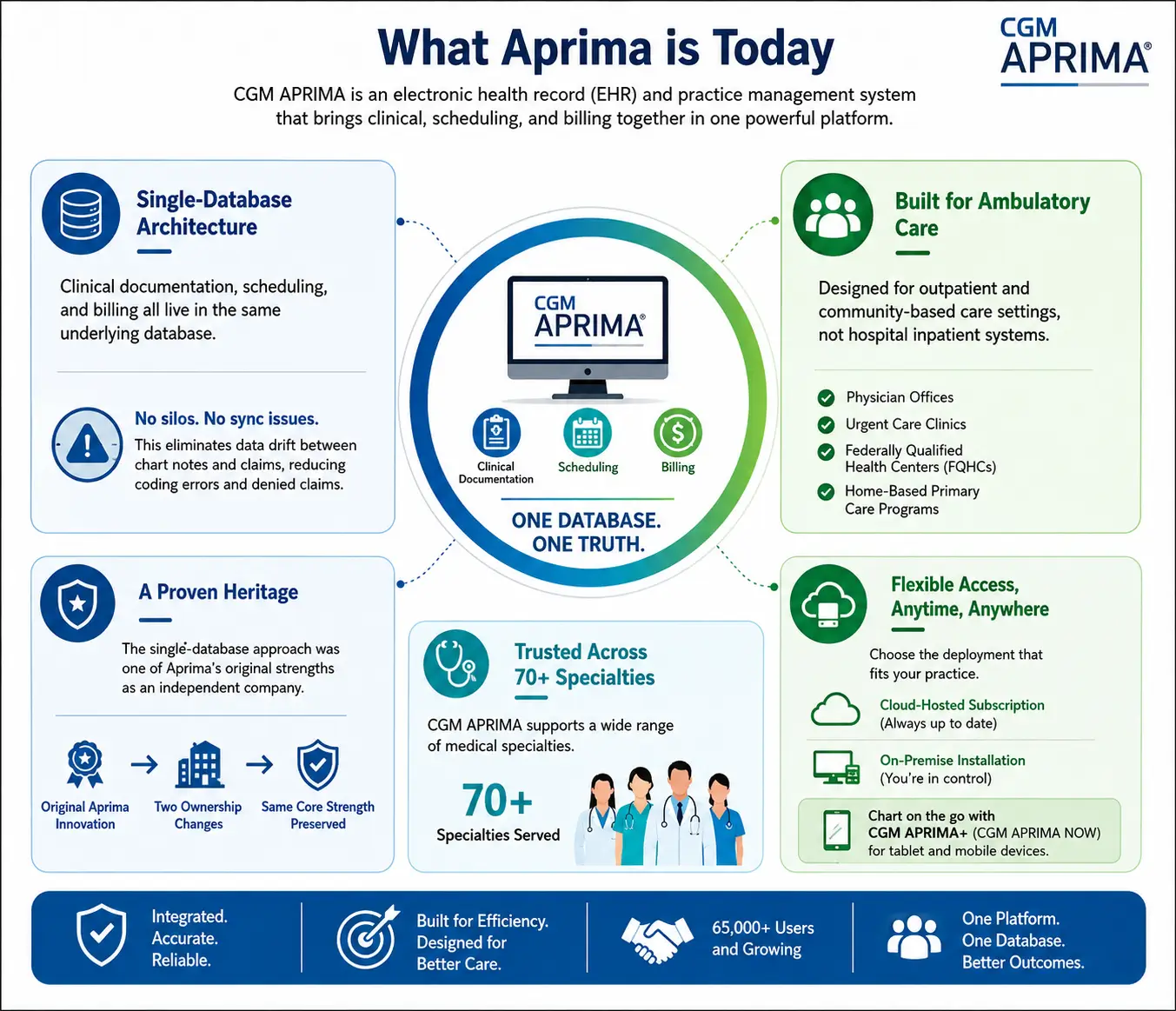
CGM APRIMA is an electronic health record and practice management system built on a single-database architecture: clinical documentation, scheduling, and billing all live in the same underlying database rather than in separate systems that need to be kept in sync. In platforms assembled by bolting an acquired billing system onto a separately built clinical module, chart notes and claims data can drift apart, a recurring source of coding errors and denied claims. The single-database approach was one of Aprima’s original selling points as an independent company, and CGM has kept it in place through two ownership changes since.
The platform serves ambulatory care: physician offices, urgent care clinics, federally qualified health centers, and home-based primary care programs, rather than hospital inpatient systems. CGM’s own site lists more than 70 specialties served, from primary care and pediatrics to orthopaedics and pain management, and puts the current user base at more than 65,000 people. It’s available as a cloud-hosted subscription or an on-premise install, with a companion app, CGM APRIMA+ (also marketed as CGM APRIMA NOW), for charting from a tablet or phone.
A brief history: three companies, one platform
Aprima Medical Software was founded in 1998 in Richardson, Texas, and spent two decades as an independent EHR vendor under CEO Michael Nissenbaum. By January 2019, when eMDs announced its acquisition of the company, Aprima said its software was used by more than 63,000 providers across over 26,000 practices and hospitals, according to the companies’ joint press release at the time. Derek Pickell, eMDs’ CEO, described the deal as a way to combine the two companies’ technology and offer ambulatory practices a more complete set of clinical and financial tools.
eMDs, based in Austin and founded in 1996, folded Aprima into its own product line and briefly operated the combined business as “Aprima, an eMDs company” during integration. That arrangement didn’t last long. Less than two years later, CompuGroup Medical, a health IT company headquartered in Koblenz, Germany, acquired eMDs outright in a deal that closed at the end of 2020, priced at roughly $240 million according to CGM’s own announcement. eMDs as a whole, which by then included Aprima, reported revenue of around 81 million euros for the fiscal year ending March 2020, while serving more than 60,000 providers. The product line was rebranded CGM APRIMA and has carried that name since.
Period | Owner | What changed |
1998–2019 | Aprima Medical Software, Inc. | Independent company in Richardson, Texas; won Best in KLAS in the small-practice ambulatory EMR/PM category in 2018 and 2019 |
2019–2020 | eMDs, Inc. | Acquired Aprima in January 2019; ran it as “Aprima, an eMDs company” during integration |
2020–present | CompuGroup Medical | Acquired eMDs, and Aprima with it, for roughly $240 million; rebranded the product CGM APRIMA |
Support contracts, updates, and sales relationships today run through CompuGroup Medical, not the original Aprima company, so training material describing “Aprima” as independent predates 2019.
Documentation tools built around how physicians already work
Most of what distinguishes CGM APRIMA from a generic EHR shows up in how a provider charts a visit, not in a features list.
Adaptive Learning and Intelligent Navigation
Rather than forcing every provider into a fixed template, the system builds its suggested findings, orders, and treatment options around a clinician’s own documentation history for a given diagnosis. Marc Mayer, DO, managing partner at Avenel Iselin Medical Group, described this in a CGM case study as letting each provider in his practice chart the way they already prefer, whether that’s voice recognition, clicking through menus, typing, or writing on a tablet, instead of everyone being pushed into one workflow. The underlying engine, which CGM calls Intelligent Navigation, lets a provider add a new chief complaint or finding to any menu mid-visit, without a system administrator rebuilding a template first.
CGM AMBI and document automation
CGM AMBI is CGM’s ambient AI tool: it listens to a patient encounter and drafts the visit note in real time, including suggested diagnoses, orders, and billing codes for the provider to review before signing off. It’s a category most major EHR vendors have entered as ambient scribing tools spread across outpatient medicine. A companion tool, CGM INDEX.AI, applies similar automation to incoming faxes and scanned documents, an unglamorous task that eats a disproportionate share of front-office time in paper-heavy specialties like orthopedics.
Anytime, Anywhere Replication
This feature lets a provider keep charting during a network outage, then syncs automatically once connectivity returns. Paired with the mobile app, it explains why CGM markets the platform toward home-based primary care programs and mobile clinics specifically, a narrower need than most office-based practices have, but one reason the software shows up often in FQHC and rural health center deployments.
Billing and coding tools for revenue cycle teams
For students studying medical billing and coding, Aprima is worth knowing specifically because of how tightly it ties documentation to the claim. Because chart notes and billing codes share one database, a superbill generates automatically from codes already entered during the visit, rather than requiring a biller to re-key CPT and ICD-10-CM codes from a paper encounter form. One EHR review site, FindEMR, reports that CGM APRIMA checks those generated codes against more than 200,000 built-in CMS billing rules before a claim goes out, catching mismatched code pairs and frequency violations that commonly trigger denials. CGM hasn’t published that specific figure itself, so it’s worth treating as a third-party estimate rather than a confirmed specification, though the underlying function, real-time edits against payer and CMS rules, matches what CGM describes on its own site.
Once a claim is ready, it routes through eMEDIX, CompuGroup Medical’s own clearinghouse, which handles transmission to payers along with denial management, patient eligibility checks, and provider enrollment. Practices that want more than software can outsource billing entirely to ARIA RCM Services, a CGM offering that KLAS Research has ranked Best in KLAS in the Ambulatory RCM Services (EHR-Associated) category for 2024, 2025, and 2026, three years running. A separate arm, ARIA Coding Services, offers coding support tied to specific payer policy changes, which matters given that ICD-10-CM alone contains more than 69,000 distinct codes, far more than any biller could reasonably memorize.
The practical takeaway for a coding or billing student: Aprima works less as a coding tool in its own right than as a data-capture layer feeding a larger, purpose-built revenue cycle operation, one that independent researchers, not just CGM’s marketing, have recognized.
ONC certification and regulatory standing
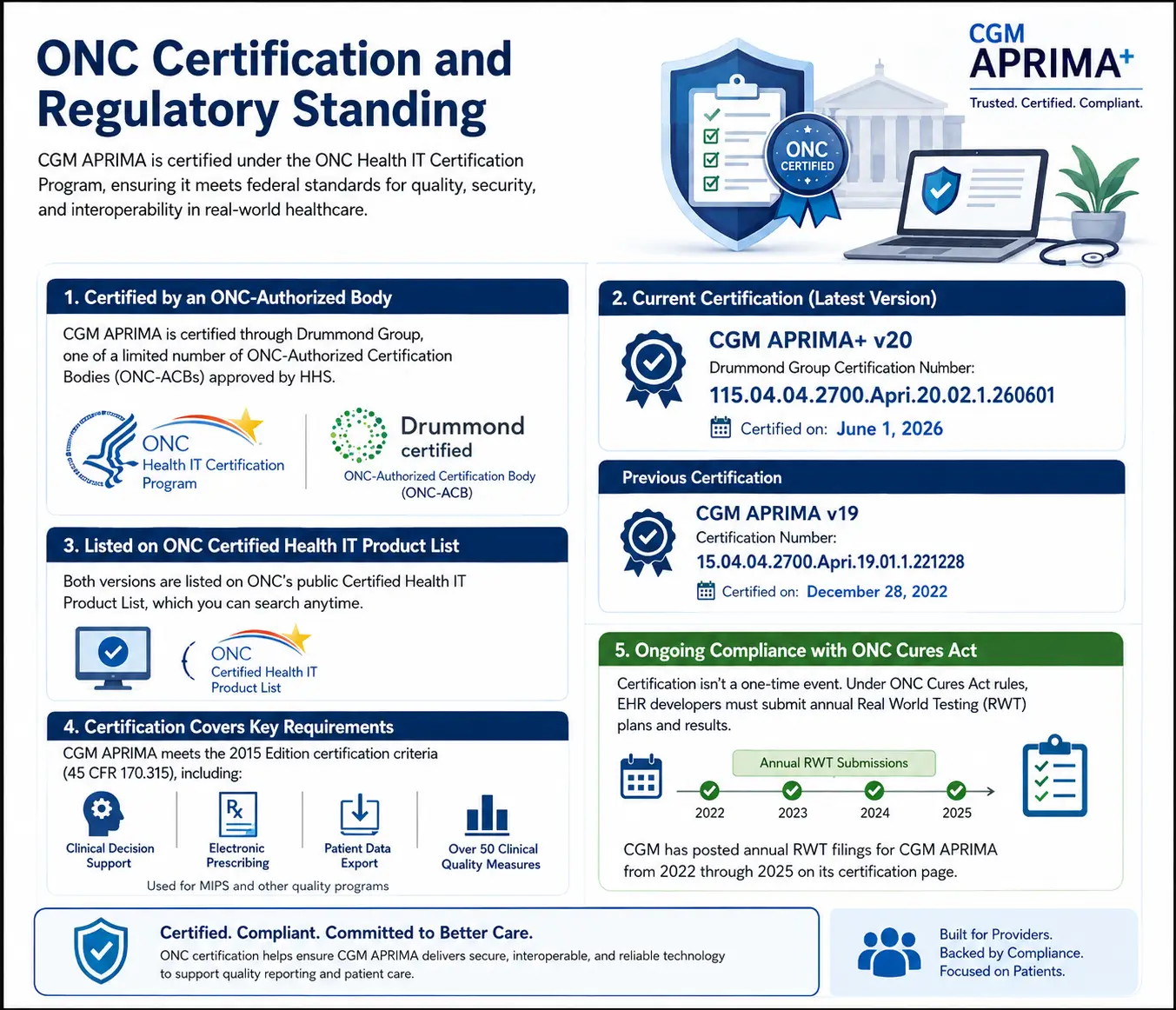
Every EHR used to support Medicare and Medicaid quality reporting has to pass certification under the ONC Health IT Certification Program, run by the HHS Office of the National Coordinator for Health Information Technology. CGM APRIMA is certified through Drummond Group, one of a small number of organizations HHS has authorized to test health IT products (an ONC-Authorized Certification Body, or ONC-ACB) against the 2015 Edition criteria codified at 45 CFR 170.315.
The most recent version, CGM APRIMA+ v20, received Drummond Group certification number 115.04.04.2700.Apri.20.02.1.260601 on June 1, 2026. An earlier version, CGM APRIMA v19, was certified on December 28, 2022, under certification number 15.04.04.2700.Apri.19.01.1.221228. Both listings are searchable on ONC’s public Certified Health IT Product List. Certification covers criteria including clinical decision support, electronic prescribing, and patient data export, along with more than fifty Clinical Quality Measures the software can calculate for MIPS and other quality programs.
Certification isn’t a one-time event. Under the ONC Cures Act rules, developers of certified health IT must submit annual Real World Testing plans and results showing the software still meets certification criteria in live use. CGM has posted these filings for CGM APRIMA every year from 2022 through 2025 on its own certification page.
What KLAS Research and current users report
Vendor pages aren’t the only source worth checking. KLAS Research, an independent firm that surveys healthcare organizations about the IT products they actually use, has tracked Aprima under three different owners. Under its original ownership, Aprima won Best in KLAS in the Small Practice Ambulatory EMR/PM category (one to ten physicians) in both 2018 and 2019. That ranking hasn’t carried over to the CGM era: as of KLAS’s most recently published data, covering surveys collected between July 2025 and July 2026, CGM APRIMA EHR doesn’t have enough live-customer survey responses to qualify for a Best in KLAS ranking, even though its average performance score of 80.1 in that data set sits above the broader ambulatory EHR market average of 75.5.
Individual comments on KLAS’s site are mixed: some reviewers value running several CompuGroup Medical products together, while at least one practice manager reported dropping CGM APRIMA EHR for a competing system. Independent review sites raise similar, more specific complaints:
- A diagnosis-search function some users find slow, with weak recognition of medical synonyms
- Occasional display and resolution mismatches on certain monitor setups
- A spell-checker that one reviewer said flags correctly spelled clinical terms, including “colonoscopy,” as errors
- A learning curve and total cost that smaller practices sometimes find higher than expected, according to the review site Software Finder
None of this makes CGM APRIMA unusual among ambulatory EHRs; every major platform collects both praise and specific, fixable complaints. What stands out is the gap between ARIA RCM Services, a three-time Best in KLAS winner, and the EHR itself, which hasn’t requalified for that ranking since the ownership change. The billing arm and the clinical software, despite sharing a brand, appear to be landing differently with the practices actually using them.
Cost, deployment, and practice fit
CGM doesn’t publish pricing on its public site; a quote comes back based on practice size, specialty, and whether a practice chooses cloud hosting or an on-premise install. FindEMR lists a typical range of $299 to $599 per provider per month, though CGM hasn’t confirmed those figures, and actual contracts likely vary with add-ons like CGM AMBI, CGM PAY, or ARIA RCM Services.
On deployment, practices can host CGM APRIMA on CGM’s cloud servers or keep it on local hardware, an option less common industry-wide but still relevant to practices with specific data-residency or connectivity needs. At least one independent review notes that the core desktop application is Windows-only, worth confirming with a sales representative for offices running mixed device types.
The platform tends to fit ambulatory settings best, solo practices through multi-specialty groups, rather than hospital systems; CGM’s own specialty list, more than 70 areas of practice, reflects that focus. Practices already using other CGM products, such as CGM LABDAQ for lab management, may find the shared vendor relationship simplifies support, a point echoed in at least one KLAS reviewer comment.
For a provider deciding whether to adopt or continue with CGM APRIMA, the software’s ownership history matters less day to day than its current certification status, its fit with a given specialty, and how its billing tools mesh with existing revenue cycle staff. For a billing and coding student, the more durable lesson may be structural: an EHR that stores clinical and financial data in one database changes what a biller’s job looks like, shifting time away from re-entering codes and toward validating the codes the system already proposed. Aprima, three ownership changes and one rebrand later, is still built around that idea. Whether that’s reason enough to choose it over a competing platform depends on questions a live demo can’t answer, like what a practice’s own claims data looks like after ninety days of real use.